Showing posts with label exchange. Show all posts

Wednesday, January 18, 2012

Exchange Management Shell Create New User with Exchange 2010 Shell


Exchange Management Shell Create New User with Exchange 2010 Shell

Command:

New-Mailbox -Name 'new user' -Alias 'nuser' -UserPrincipalName 'nuser@your-domain.com' -SamAccountName 'nuser' -FirstName 'new' -Initials '' -LastName 'user' -Password 'System.Security.SecureString' -ResetPasswordOnNextLogon $false


I used this just today and it worked very nicely. I suspect the command can be oput into a script or batch file to create many accounts without the need for exchange 2010 Managment console.

Monday, October 26, 2009

Get outlook web access OWA working without reboot on II6 Exchange 2003

The system service with a process id of 4 on 2003 servers listens on port 80 and 443. I checked this with another 2003 exchange email server to be close to sure of that being correct. It too has the system service, not an IIS service, with process id of 4 listening on 80 and 443.

I changed the port the default web site uses on the problem outlook web acess (OWA) web server to 81, restarted the services. Still couldn't connect with localserver:81 but now telnetting to port 80 worked. Just get a blank line is displayed when telnetting to port 80 (II6) unlike smtp that sends some text. Before the change to 81 for the default web site, the error returned by telnetting to port 80 was "connection refused". Changed the IIS default web site back to 80 saved, restarted the IIS service again and the default page loads and the OWA page also loads. As of now, no reboot of the server is required. Hope the fix holds.

Could try this solution on other servers that have IIS not responding and of course leads to OWA not working. Don't know if the same solution applies to 2008 server with exchange 2007 or 2003 server with exchange 2007 but some varient of the steps might just do the same.

This exchange 2003 server's access via port 80 (default web browser port) was working fine then suddenly IIS and OWA stopped working. I've seen this all too often over the years and ussually meant the server had to be rebooted.


PC Tech Go - Blog Home
Permanent link to this post - Get outlook web access (owa) working without server reboot


Sunday, October 12, 2008

Error 0x8004010F Object Could Not Be Found Exchange 2007

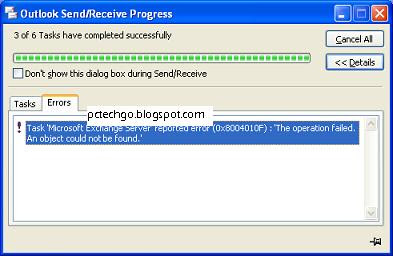
Error 0x8004010F ..."An object could not be found" occurs when you do a manual send receive (the error also occurs with automatic background send receive) in Outlook 2003 or 2007 with Exchange 2007. In this case it was Exchange 2007 with service pack 2 (Exchange 2007 SP2). The complete error message reads as the following:

Task 'Microsoft Exchange Server' reported error (0x8004010F): ' The operation failed. An object could not be found.'

The classic error notification window can be displayed by clicking on the bottom right corner of Outlook or Outlook may have been already configured to display send/receive status each time. In either case, this is what the user sees:
This message just blares out to the user who thinks their emails are not being sent and as you know some users can easily get rattled and panic. The emails are in fact being sent out at least in my case and the majority of cases. If they are now getting and sending emails with this error message then the problem may be worse than this post will be able to assist with. The user's desktop can send and receive email just fine but receive this message each and every time they click on the send/receive button. As a reminder, this and other application problems can be be resolved in most cases quicker by using remote access software. Desktop support software such as online desktop support software enables remote access and control of desktop computers and servers to troubleshoot basic and complex issues remotely. There are tons of sites that suggest rebuilding address books and fixing rights and permissions and a whole slew of other things that just don't seem to help the problem out. After trying those I realized this was not the average problem and mainly because I was getting this 0x8004010F error message with exchange 2007 and their post were solutions aimed at Exchange 2003 or 2000. There are some things that are different in Exchange 2007 that should be remembered if one is to continue rolling out Exchange 2007 or willingly or unwillingly participate in troubleshooting issues on this new platform. Keep the autodiscover feature on the list of things to check when troubleshooting Exchange 2007 issues with Outlook 2007, Outlook 2003 and even with Outlook Web Access. I have included Outlook Web Access too because the dynamics of finding exchange servers has changed somewhat and so too have the SSL certs changed (maybe that will be another post). Add an autodiscover.yourdomain.com entry into your DNS servers and your problem will most likely go away.


Please post a reply in the comments if this post was useful to you and share so others can find it faster. Thank you.